
How to Identify a Product From a Photo: A Step-by-Step Guide
Learn how to identify products from photos using labels, model numbers, barcodes, image search, and AI—especially when processing auction or liquidation inventory.
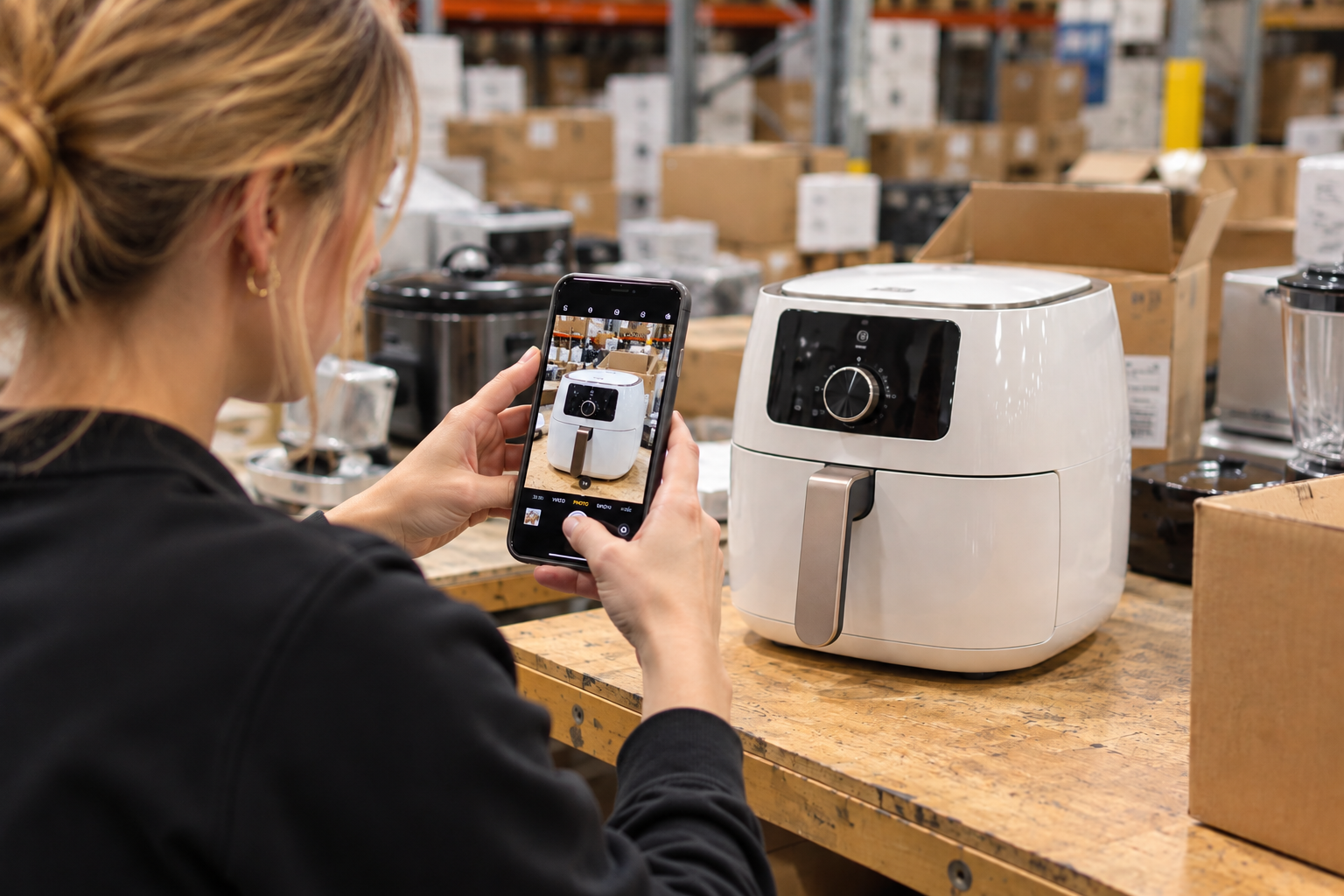
Sometimes you have a product in front of you but don't know its exact name or model.
This is especially common for auction houses, resellers, liquidation businesses, and warehouse teams processing customer returns, overstock, or mixed inventory.
Some products arrive without their original packaging. Others have unclear labels, and many products look nearly identical even though they have different model numbers, sizes, capacities, or features.
Fortunately, there are several ways to identify a product using photos and the information available on the item itself.
Here’s a practical step-by-step process.
1. Check the Information on the Product First
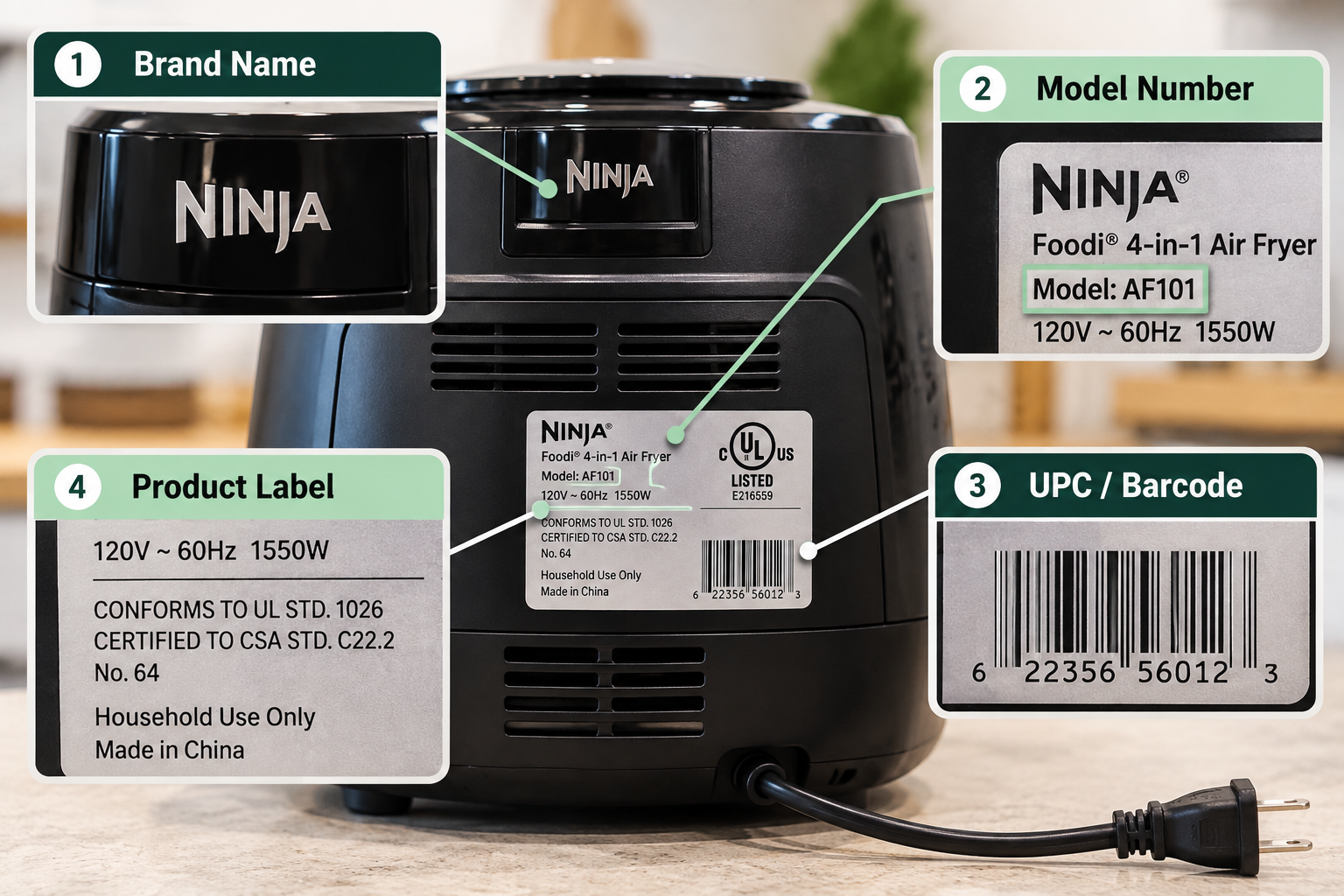
Before using image search, start by looking for information printed directly on the product.
Useful details may include:
- Brand name
- Model number
- UPC or barcode
- Product label
- Manufacturer name
- Product number or SKU
- Size, capacity, or other specifications
The model number can be especially useful when trying to identify an exact product.
Two products may look nearly identical but have different capacities, features, or specifications.
Whenever possible, take a clear photo of the entire product as well as close-up photos of labels, model numbers, and barcodes.
These details can make product identification much easier.
2. Use Image Search to Find Similar Products
If the product doesn't provide enough identifying information, image search can help.
Take a clear photo that shows the entire product and use an image search tool to find visually similar items.
Image search can be useful when:
- The product name isn't visible
- The original packaging is missing
- You know the brand but not the model
- You want to find similar products for comparison
However, finding a visually similar product doesn't necessarily mean you've found the exact product.
Many manufacturers sell multiple models with nearly identical designs.
Always verify the result using additional product information whenever possible.
3. Take Photos From Multiple Angles
A single photo may not contain enough information to identify a product accurately.
Important details can appear on the back, bottom, side, or inside of a product.
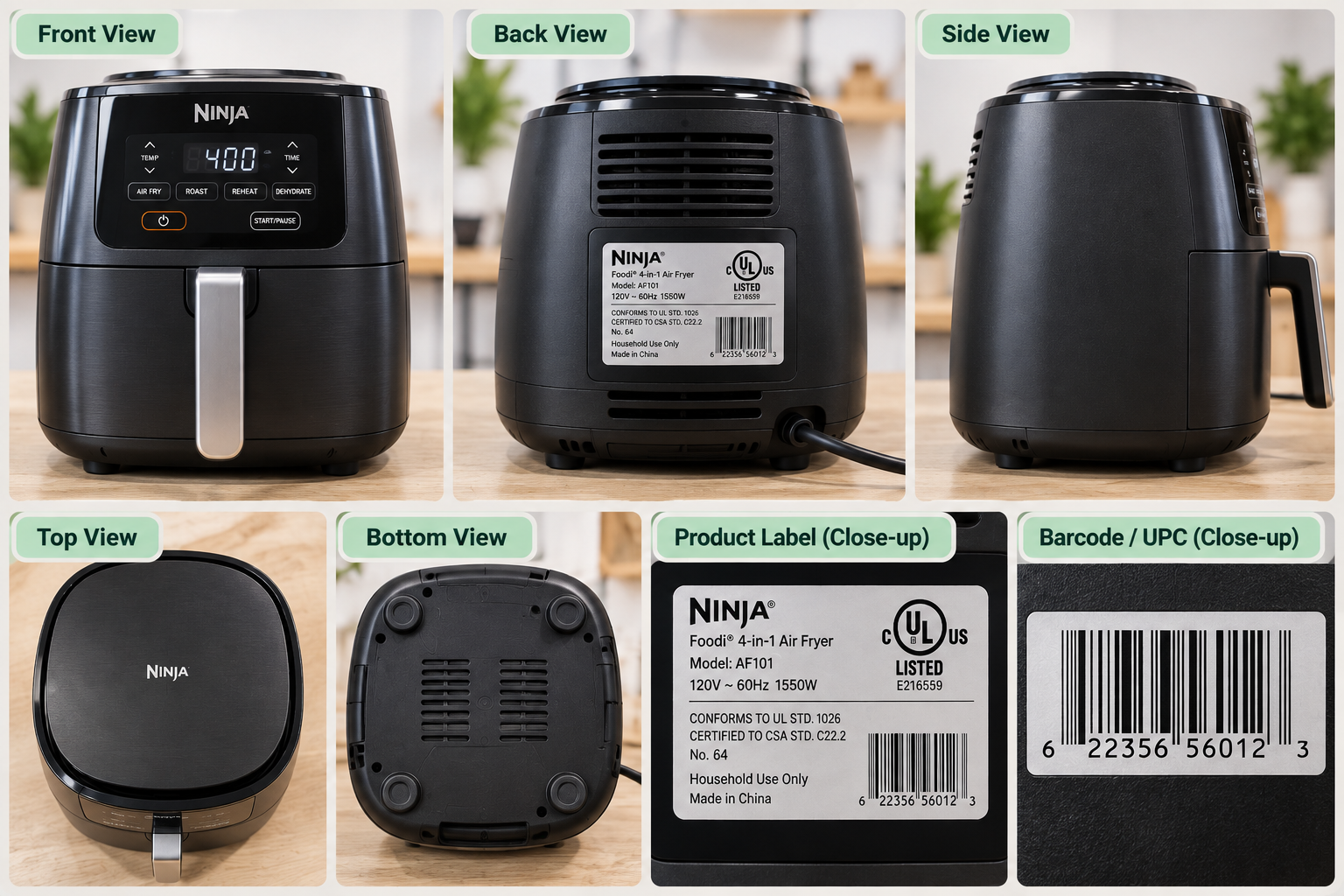
If the product has distinctive buttons, ports, accessories, connectors, or other identifying features, photograph those as well.
Multiple photos provide more information for both manual searches and AI-assisted product identification.
4. Compare the Search Result With the Actual Product
Once you've found a possible match, don't immediately assume it's the correct product.
Compare the details carefully.
Check:
- Brand
- Model number
- Size
- Color
- Capacity
- Key features
- Included accessories
- Product design
For example, two air fryers from the same manufacturer may look almost identical while having different capacities or features.
Incorrect product identification can create additional problems later.
The wrong product may lead to an incorrect title, description, specifications, MSRP, or starting bid.
That's why accurate product identification is an important first step in creating an auction listing.
5. Don't Rely on a Single Retail Listing
Even when you find what appears to be the correct product, avoid relying entirely on one retailer's listing.
When possible, compare information from the manufacturer and multiple reliable sources.
Pay particular attention to:
Model Number
UPC
Specifications
Size or Capacity
Included Components
Product titles can vary between retailers, while model numbers and UPCs can provide stronger clues about whether you've found the same item.
Cross-checking information also reduces the chance of using inaccurate or outdated product details.
6. Product Identification and Item Condition Are Different Things
There is an important distinction between identifying a product and determining the condition of the physical item in front of you.
Finding the correct model does not automatically tell you whether your specific item works properly or is complete.
This is especially important with customer returns and liquidation inventory.
Depending on your inspection process, condition information might include:
- New
- Open Box
- Used
- Damaged
- Missing Parts
- Unable to Test
Information found online about a new retail product should not automatically be used to describe the condition of the physical item you are selling.
For auction listings, product information and actual item condition should be treated separately.
7. Manual Product Identification Works—Until Inventory Volume Grows
If you only need to identify one or two products, manual research may be perfectly manageable.
The challenge appears when you're processing dozens or hundreds of items.
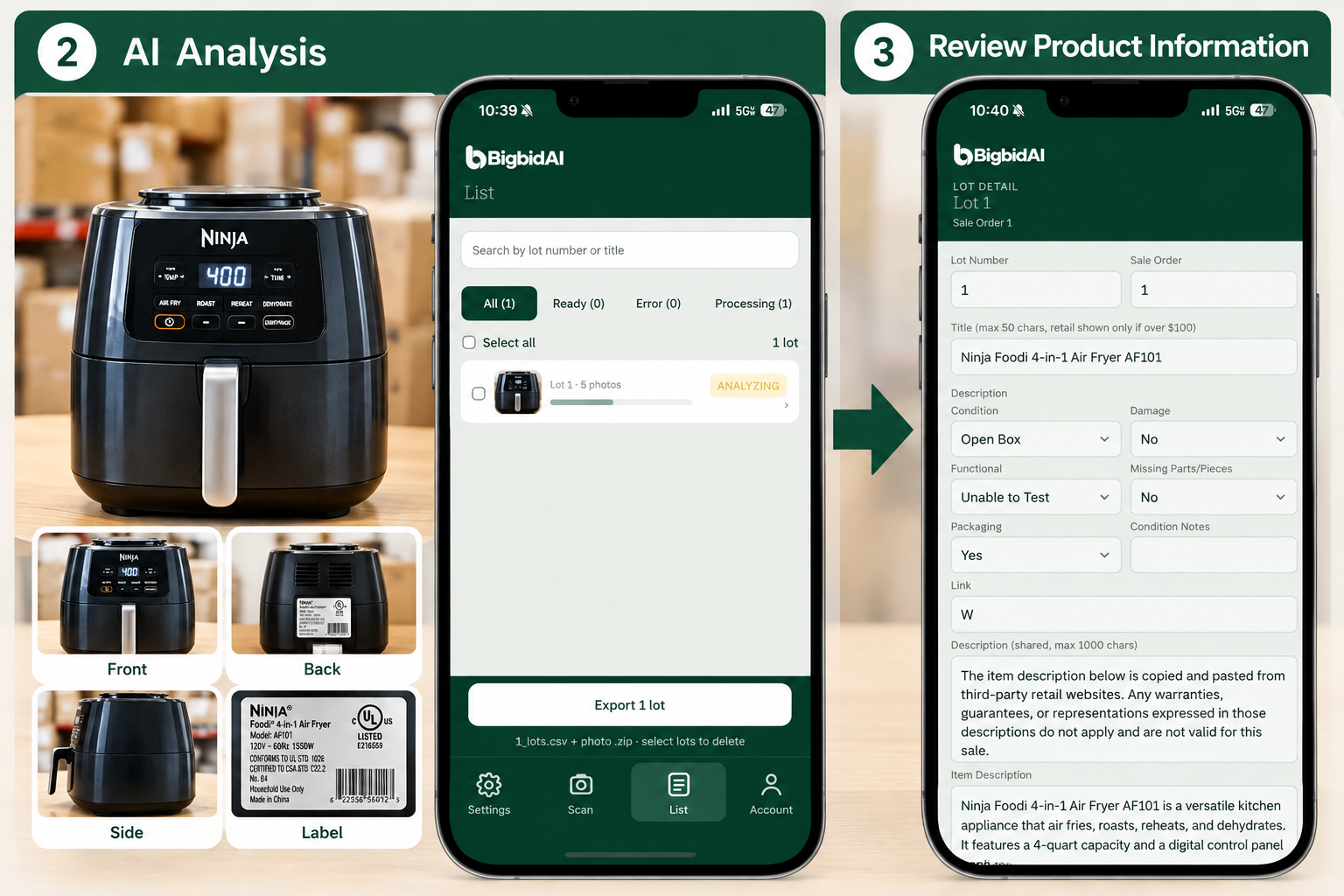
Doing this once isn't difficult.
Doing it 100 times can become a significant workload.
For high-volume auction houses and liquidation businesses, the challenge isn't only identifying products accurately.
It's identifying them efficiently.
If you're looking for ways to streamline the entire listing process, see our guide: How to Create Auction Listings Faster: A Step-by-Step Guide.
8. Use AI to Assist With Product Identification
AI and image recognition can also assist with product identification.
Instead of manually starting a new search for every item, AI systems can analyze product photos and use visible characteristics and available information to help determine what the product may be.
AI can also help organize information that would otherwise require multiple manual searches.
This can be particularly useful when processing large volumes of auction or liquidation inventory.
However, AI isn't perfect.
Products with similar designs, unclear labels, or model variations may still be misidentified.
For that reason, AI-generated product information should be reviewed before it is used in a published auction listing.
The goal isn't to eliminate human verification.
The goal is to reduce repetitive searching and data entry.
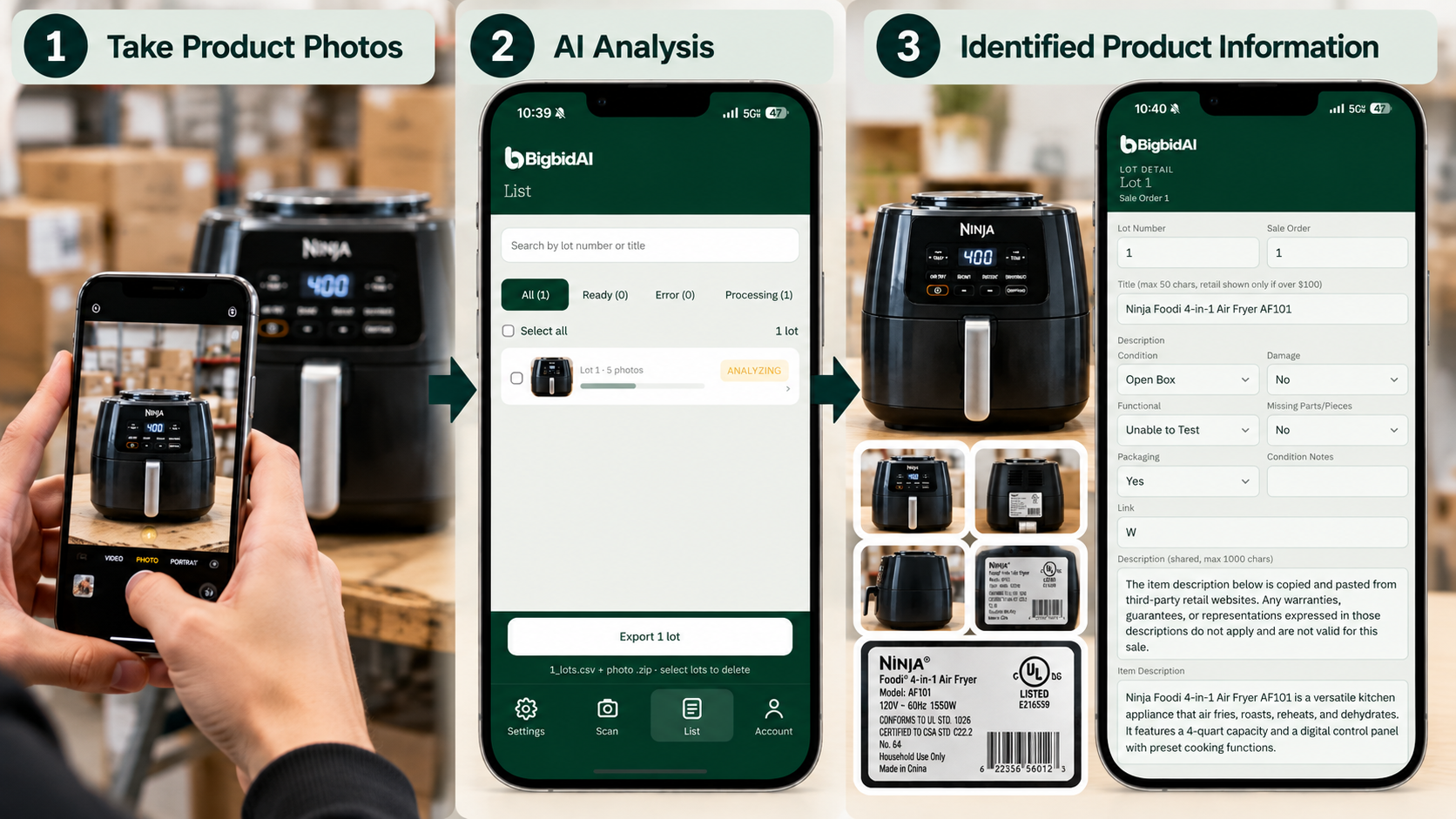
From Product Photos to Product Information With bigbidAI
For auction houses, resellers, and liquidation businesses, manually identifying every product can become one of the most time-consuming parts of inventory processing.
bigbidAI is designed to help reduce that repetitive work.
Instead of searching for each product from scratch, you can capture product photos and let AI assist with analyzing the item and generating product information.
bigbidAI can help with tasks such as:
Product Identification
Product Titles
Lot Descriptions
MSRP Reference Information
Recommended Starting Bids
The generated information can then be reviewed and edited before it is used.
The workflow becomes:
Take Photos
↓
AI Analysis
↓
Review & Edit
↓
Export
AI doesn't replace the final review.
It helps reduce the repetitive work that happens before the review.
Final Thoughts
Accurate product identification is one of the most important first steps in creating a reliable auction listing.
If the wrong product is identified, the error can affect the product title, specifications, description, MSRP, and pricing decisions that follow.
For a small number of items, model numbers, barcodes, and image search may be all you need.
But when you're processing dozens or hundreds of auction or liquidation items every day, manually researching each product can quickly become a major part of your workload.
The more inventory you process, the more important it becomes to streamline the entire workflow:
Product Photos → Product Identification → Product Information → Listing Creation
That's where automation can make a meaningful difference.
Need to identify products from photos faster?
Try bigbidAI to turn product photos into structured auction lot information with AI-assisted product identification, listing creation, pricing information, and export.